


FaceTrix: AI Video Generator
4.1183.00 Reviews
App Specs
- Version
- 1.9.0
- Updated On
- License
- Free
- Downloads
- 100,000+
- Developer
- Mobicraft
- Categories
- Photography
- Platform
- Android
Screenshots
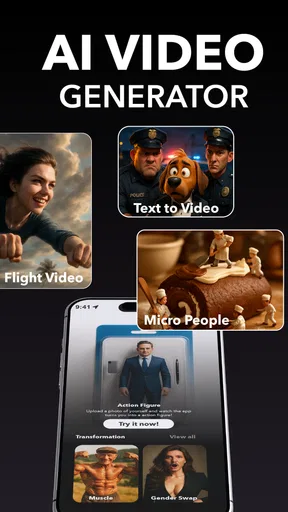

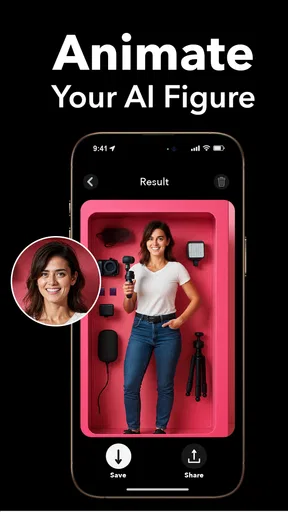
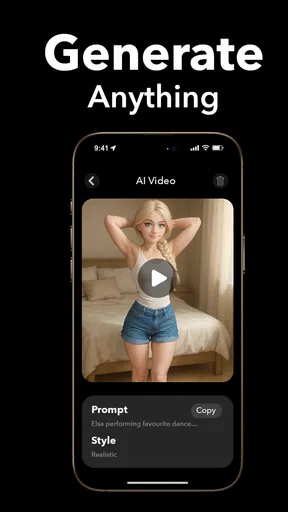
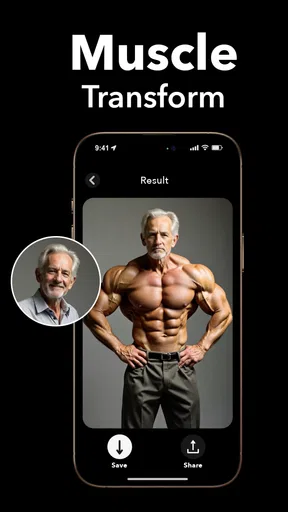
 Analysis by AppCompare
Face swaps can turn an ordinary photo into a quick joke, but they work best when everyone sharing the device knows what is being made and where it may end up. I tried FaceTrix: AI Video & Face Swap with that everyday, shared-use question in mind: is it something a household can pick up for a laugh, and what should people consider before passing a phone around?
A quick creative activity for a shared device
FaceTrix is a free photography app from Mobicraft, currently at version 1.4.1, with a 4.2 average from around four thousand ratings. Its appeal is easy to understand in a household: one person can choose a picture, another can suggest a face or a clip, and the result gives everyone something to react to. It is better suited to short, playful sessions than to a complicated editing project.
A realistic use is a family gathering where adults take turns making a harmless image for a private group chat. I would agree on the subject and audience before creating anything, especially if the image includes a child, a relative who is not present, or someone who might not enjoy being edited. A funny result is not automatically a welcome one, and asking first is the simplest way to keep the activity comfortable.
Set expectations before handing over the phone
FaceTrix is simple enough to invite experimentation, but shared devices make it worth pausing before the first upload. Decide whether the person using it may select from the device’s photos, make a video, or share a finished result. Those are different steps, and a child who can make an image does not necessarily need to be the person who decides where it goes.
I would keep the first try deliberate: choose one non-sensitive photo, make one edit, inspect the result together, and only then decide whether to save or share it. This helps avoid the common “I tapped through too quickly” problem and gives everyone a chance to catch an awkward crop, an unintended expression, or a result that could be misunderstood outside the room.
Coordination matters more than extra editing
When several people use one phone, a little coordination prevents confusion. Agree whose image is being edited, who is making the final choice, and whether the output is staying on the device or being sent elsewhere. If the finished file is meant for a group chat, let the person depicted see it first. That small check is more useful than spending extra time adjusting a face that the subject never wanted swapped.
For a shared tablet or family phone, I would also avoid treating a saved image as an informal family keepsake without asking the people shown. A novelty edit can be forwarded or viewed later without the context that made it funny. Keeping the audience narrow and the joke kind is a practical boundary, not a restriction on creativity.
Worth Reading Before You Choose

Flipboard Shows What News Apps Must Do Beyond the Feed

Switching to Android Auto Means Rethinking Your Driving Routine

Google Calendar Makes a Crowded Week Easier to Manage

Ludo King Makes the Most of the Minutes Between Plans

Baby Panda World Brings Quick Play to Modern Phones, but Its Game Library Feels Busy

ESPN’s Live Game View Makes Following Close Games Easier
Age, trust, and the limits of an app rating
The app carries a Teen content rating, so I would not assume it is automatically suitable for every younger child just because the controls look approachable. The right choice depends on the child, the images involved, and whether an adult is available to guide sharing. A rating can help frame that decision, but it does not replace a conversation about consent, embarrassment, or how edited media can be taken out of context.
FaceTrix has passed 100,000 installs, but popularity alone does not tell me whether a particular household will find it comfortable. I would use it only with people who understand that face-swapped material is altered, and I would avoid making realistic edits of someone who has not agreed. If you want a tool for routine family albums, straightforward cropping and color correction are a better fit; this app is for playful transformation, not careful photo organization.
First Impressions and Installation
Installing FaceTrix: AI Video & Face Swap was a breeze. Available on both Android and iOS, it took me just a few moments to download and get started. The app's interface is clean and intuitive, which is always a plus. I mean, who has the patience for clunky menus and confusing instructions, right?
Getting Started with Face Swaps
The app offers a user-friendly tutorial right off the bat, guiding you through the basics of face swapping. You can either upload your own photos or use the app's extensive library of celebrity faces. I decided to start with a picture of myself and swap faces with a famous actor. The process was surprisingly quick! Just a couple of taps, and voilà, I was staring at my face on someone else's body.
The AI behind FaceTrix is pretty impressive. It seamlessly blends facial features, and the results are often hilarious or uncanny. The technology ensures that the lighting and skin tone match, making the swap look as realistic as possible.
Exploring Video Features
Beyond static images, FaceTrix also lets you swap faces in videos. This was where things got really fun! I uploaded a short clip, and within moments, the app had replaced my face with a friend's. Watching myself speak with someone else's face was both bizarre and entertaining. The app uses advanced algorithms to track movements, ensuring the swap stays aligned even in motion.
For those who love to create content, this feature is a goldmine. Imagine the possibilities for social media posts or just having a laugh with friends.
Customization and Creativity
What sets FaceTrix apart is the level of customization it offers. You can adjust various aspects, like the size and position of the swapped face, to get everything just right. There's also a handy editing tool to tweak the results further, adding filters or effects if you're feeling adventurous.
The app encourages user creativity, allowing you to not only swap faces but also create hilarious morphs. Whether you want to transform into a cartoon character or mix features from different faces, the possibilities are endless.
Sharing and Social Integration
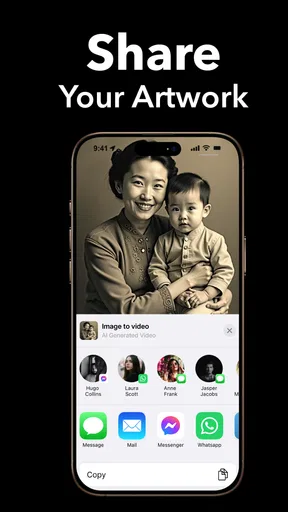
Once you've created your masterpiece, the next step is sharing it with the world. FaceTrix makes this super easy. With direct integration to platforms like Instagram, Facebook, and TikTok, you can upload your creations in a snap. The app even provides hashtags and captions suggestions to boost your post's visibility.
If you're more of a private person, you can save the files directly to your device and share them via messaging apps. Either way, it's all about spreading the fun.
Privacy and Safety
In this day and age, privacy is a big concern. FaceTrix addresses this by ensuring that all uploaded photos and videos are processed locally on your device. This means your personal data isn’t stored or shared without your consent. While this provides peace of mind, always remember to be cautious and avoid uploading sensitive images.
Choosing it over a general photo editor
FaceTrix has a specific kind of fun: it changes who appears in a picture or clip. That makes it different from a standard camera editor, where the main work is usually cropping, lighting, color, or removing small distractions. If I want a polished photo for a profile or a clear family snapshot, I would reach for a conventional editor. If I want a playful transformation that becomes the subject of the image, FaceTrix is the more direct choice.
There is a trade-off, though. A face swap depends heavily on the source material, so a clear, front-facing portrait is a better starting point than a blurry picture, a face hidden by hair, or an image with harsh shadows. For video, I would begin with a short clip where the face stays visible; busy movement and changing angles give the effect more chances to look odd. Choosing suitable source material is often more effective than trying to rescue a difficult result with edits afterward.
Small workflow choices that improve the result
One useful habit is to make a test with a copy or an unimportant image before investing time in a version meant to share. Face swaps can look convincing at a glance yet feel strange around the edges or during a change in expression. I would inspect the result at full size and, for a clip, watch the entire sequence rather than judging only its opening frame. That catches mismatched moments before they become the version everyone sees.
Another practical choice is to treat customization as correction, not as a promise that every source will work. Adjusting size or position can help a face sit more naturally, but it cannot make every angle or lighting condition match. I would make a few purposeful tweaks and stop if the image still looks forced. The app is strongest when the underlying photo or video already gives the effect a fair chance.
Free to start, with a spending decision to make
There is no upfront price to try the app, but FaceTrix includes in-app purchases ranging from $1.99 to $129.99 per item. That is a broad range, so I would not treat “free” as a reason to tap through purchase screens casually. On a shared device, the person paying should be clear before anyone explores paid options; on a child’s device, an adult should handle that decision. A quick novelty test does not require committing to a purchase before you know whether the style suits you.
The practical question is whether you expect to return to the app. If you only want one joke for a gathering, try the free experience first and decide whether its results are worth spending on. If you are comparing it with a general editor, consider that those tools may be better for regular touch-ups, while this app’s value is in face-based effects. I would pay only when I had a specific recurring use, not simply because a purchase option appears during experimentation.
Who will enjoy it, and who may prefer another tool
I can see FaceTrix working well for friends who like making short visual jokes, casual creators testing a playful idea, or adults guiding a shared activity. It is also a quick way to turn a suitable portrait into something unexpected without learning a full editing workflow. The best results are likely to come when the people involved are comfortable with the joke and the image is meant for a limited, understood audience.
I would skip it if your priority is precise professional retouching, organizing a large photo library, or making a realistic edit that must remain seamless under close scrutiny. I would also choose a simpler alternative if all you need is to trim a clip or adjust brightness. FaceTrix’s specialty is the transformation itself; that focus is a strength when it matches your goal and unnecessary friction when it does not.
For device compatibility, the listed minimum is Android 8.0. The app is free to install and carries a Teen rating, details worth checking when choosing it for a household device. I would still make the decision based on who will use it and how the creations will be handled, rather than treating either the age label or the low barrier to trying it as a substitute for supervision.
Final Thoughts
All in all, FaceTrix: AI Video & Face Swap is a must-have for anyone who loves playing around with digital media. It's easy to use, offers a ton of features, and provides endless entertainment. Whether you're looking to surprise a friend or just have a laugh, this app delivers in spades.
So, if you're in the mood for some digital mischief, give FaceTrix a try. Just remember, with great power comes great responsibility. Happy swapping!
Pros
- Easy-to-use interface for quick edits.
- High-quality video output.
- Wide variety of face swap options.
- Real-time preview feature.
- Regular updates with new features.
Cons
- Requires internet connection for full features.
- Occasional crashes on older devices.
- Ads can be intrusive during use.
- Limited free features; requires in-app purchases.
- Large app size may affect storage.
FAQs for FaceTrix: AI Video Generator
What features does FaceTrix: AI Video & Face Swap offer?
FaceTrix provides advanced AI technology to seamlessly swap faces in videos and images, allowing users to create fun and realistic content. It includes features like real-time face tracking, multiple face swapping, and a wide array of effects and filters to enhance creativity and user engagement.
Is FaceTrix: AI Video & Face Swap easy to use for beginners?
Yes, FaceTrix is designed with user-friendliness in mind. The intuitive interface allows beginners to easily navigate and utilize its features. Step-by-step tutorials and in-app guidance ensure that even those new to video editing can efficiently create and share content.
Are there any privacy concerns with using FaceTrix?
FaceTrix takes privacy seriously. The app ensures that user data is encrypted and not shared with third parties without consent. Users have control over their content and can manage privacy settings to determine how their data is used and stored.
What are the system requirements for installing FaceTrix?
FaceTrix is compatible with both Android and iOS devices. It requires Android 8.0 or higher and iOS 12.0 or later. The app is optimized for devices with at least 3GB of RAM to ensure smooth performance and high-quality output for video processing.
Does FaceTrix offer any in-app purchases or subscriptions?
While FaceTrix offers a free version with basic features, users can opt for in-app purchases or a subscription to access premium features. These include exclusive filters, effects, and the ability to export content in higher resolutions. Subscription options are available on a monthly or annual basis.


